
Epiloft 3D Studio
Turn the drone you already own into a property-mapping business.
The same aircraft you use for listing photos can produce a measurable 3D model of a property for planning and estimating. Not a survey. Below is a real model, live on this page. Grab it and spin it.
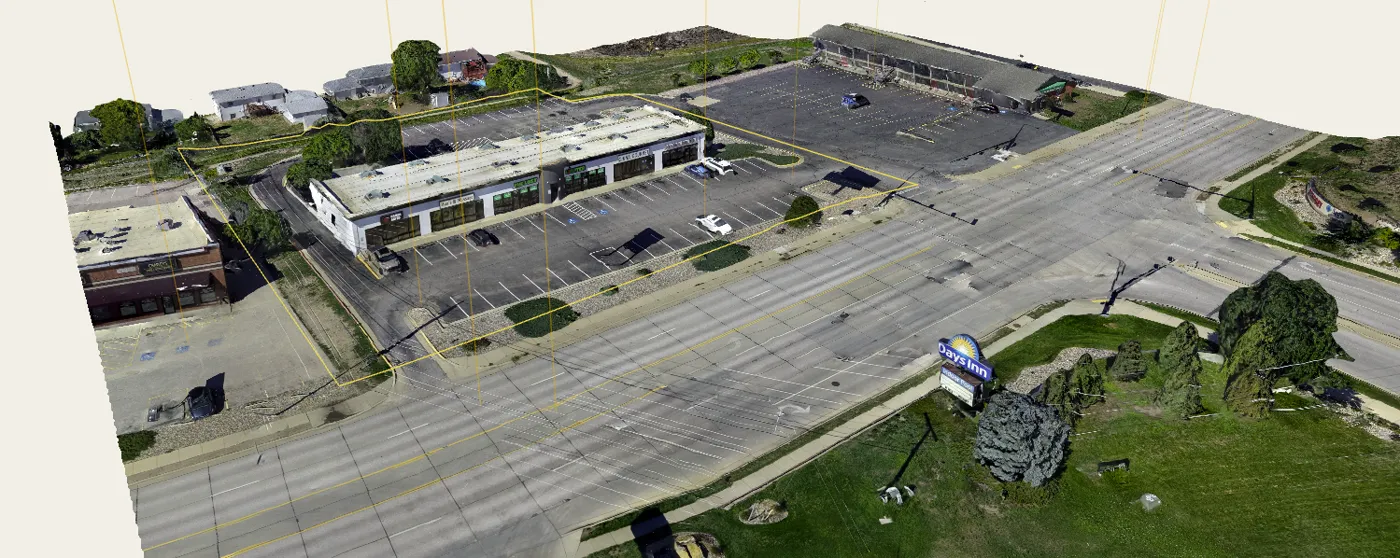
This is a real model, not a demo reel. Drag to orbit, scroll to zoom. Flown with a consumer drone and processed in Epiloft.
Flown with a DJI Mini 5 Pro using a planned mission.
What your client actually gets
Not a file. A page they open on a phone, turn the property in their hand, and send to their partner, their lender or their builder.
The model is the product
Photos show one angle. A model answers every question they were going to call you about: how the pad sits, how steep the back half is, what the neighbour looks like from the second storey.
One link, no software
The share page carries the model, the property map, your photos and any markup. Nothing to download, nothing to install, works on a phone in a truck.
Your name on it
Your logo, your contact details, your page. The client never has to know what you built it in.
The tools that close jobs
These are the reasons a builder, an excavator or a developer pays more for your flight than they pay for photos.
Volumes and takeoffs
Plan dirt work from your desk. Draw around a stockpile or an excavation and get cut, fill and volume, with a takeoff PDF for your job file.
Volumes are measured from the model you flew, so the result tracks your capture. Compare a pile month to month or check a cut against a plan. For planning and estimating. Not a survey.
Foundation Fit
Drop a building on the captured terrain and see what it costs in dirt. Window wells, daylight, finish grade, cut and fill, excavation and backfill, all against the surface you captured.
For a lot buyer deciding between two parcels, this can clarify the tradeoff. Elevations are relative to the captured surface unless the project has been anchored to a datum. For planning and estimating. Not a survey.
Orthomosaic tiles
One flat, straight-down, current image of the whole site, layered on the map with the approximate parcel boundary over it. Zoom in far enough to count parking stalls or read a stake.
This is the layer that makes satellite imagery look old, because it is yours and it is from this week.
Mission planner
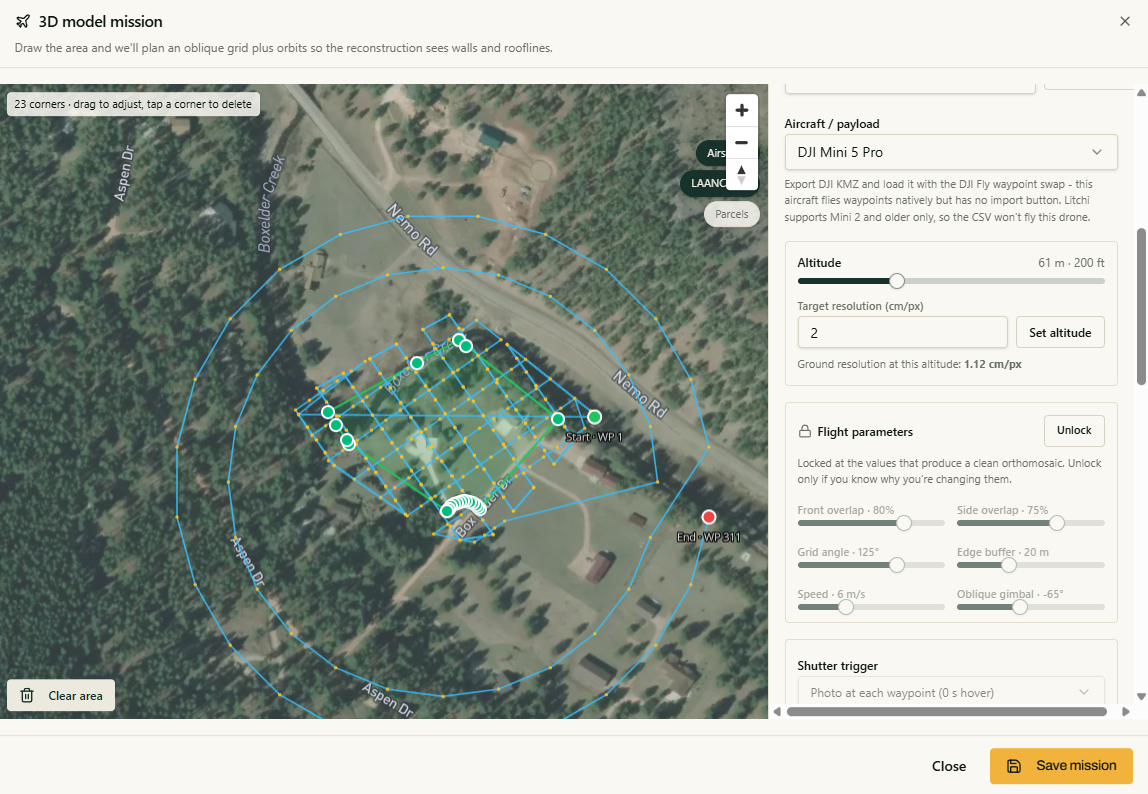
Pick the property, get a flight plan built for the deliverable you are selling: altitude, overlap, angle and photo count already worked out.
Fly the plan, pull the card, upload. The guesswork that ruins a first 3D attempt is handled before you leave the truck.
Already build your own models?
You do not have to change how you process. Epiloft is happy to be only the delivery half.
Process in Epiloft
Upload the flight and let the cloud do it, billed per image with prepaid credits. No workstation, no overnight render, no license.
Or import what you already made
Models from RealityCapture, Metashape or DJI Terra import into a project and deliver through the same share page, with the same branding and the same client experience. You place the model on the property during import.
How processing works
Three steps. No photogrammetry vocabulary required, and we tell you exactly how to fly it.
- Step 1
Fly it
Use the mission planner or your own capture routine. Epiloft gives you the altitude, overlap and photo count for the job.
- Step 2
Upload it
Drag the folder in. Photos go up in the background while you do something else.
- Step 3
Get the model
The cloud builds the 3D model and the ortho, then it lands in your project ready to publish.
Processing is billed per image, with prepaid credits
One credit processes one image. Credits do not expire, and nothing is spent until you start a job.
$24
500 images
A single small parcel mission
$88
2,000 images
Roughly 8 typical land missions
$234
6,000 images
Subdivision-scale month
Pricing
One subscription for the whole Studio. Processing is the only thing billed on top, and only when you run it.
Epiloft 3D Studio
Founding pricing$149/month, billed annually
Lock in this rate for as long as your subscription stays active. Prices will rise as the platform grows; founding members keep theirs.
Everything in Epiloft Photo Pro, plus the whole Studio: 3D models, orthomosaic tiles, planning tools and mission planning.
- Everything in Epiloft Photo Pro
- Cloud photogrammetry and the 3D model studio
- Publish interactive 3D viewers and ortho tiles to share pages
- Cut/fill, volumes and takeoffs for planning and estimating
- For planning and estimating. Not a survey.
- Foundation Fit, sun shading, flood and datum tools
- Import models you built elsewhere
- Flight mission planner
- 500 GB storage
Annual works out to $1,788 a year. Cloud processing is billed separately with prepaid credits.
Cloud processing is billed separately with prepaid credits, at the pack prices above.
Just photos and maps, no 3D processing?
Epiloft Photo Pro is $41/mo billed annually · $49 month-to-month and covers the photo editor, approximate parcel boundaries, pins, markup and share pages. See Photo Pro.
Flying with a crew? See team plans.
Straight answers
- What drones work for this?
- Almost any modern camera drone that writes position and gimbal data into its photos: DJI Mavic and Air, Mini 4 Pro, Phantom, Matrice, Autel Evo, Skydio. You do not need a survey drone, a payload camera or a special sensor. If it takes a clean photo and knows where it was, it can build a model.
- Do I need RTK?
- No, not for visual deliverables or relative measurements. Ordinary drone GPS works for planning and estimating, such as comparing a pile to last month or placing a building concept on the terrain. Tighter results take RTK or ground control. We will never call an Epiloft model a survey.
- How long does processing take?
- Most single-property flights come back in well under an hour; big subdivision sets can run several hours. It happens in the cloud, so your laptop is free and you can close the tab. You get told when it is done.
- How do I know how to fly it?
- Epiloft gives you the recipe for each job type: altitude, overlap, angle, pattern and photo count. Load the mission planner, pick the property, fly the plan. Nothing to guess at.
- What happens to my models if I cancel?
- Nothing is deleted. Your projects and share pages go quiet behind a branded screen, your links stay reserved, and everything comes straight back the moment you subscribe again.
- Can I try it on photos only first?
- Yes. Start a 14-day trial on Photo Pro or 3D Studio. The trial allows up to 5 projects, 1,500 photos in total and 25 GB of storage, and it opens 3D and ortho processing with 100 processing credits included, so you can bring a real dataset and run a real model. You can change plans when the work changes.